How to protect windows
Protect windows from viruses and hackers is a big issue now a days. When we attach with internet, our each file on computer can be access by any hacker, no matter where he is using his computer.
Here are few methods which will help you to protect windows from unauthorized access.
1.Turn off location:
Windows is accessing our location through internet device. Its somehow a useful feature because through location, windows suggest us about our nearest location that is offering discounts on shopping, nearest hotels and weather updates.
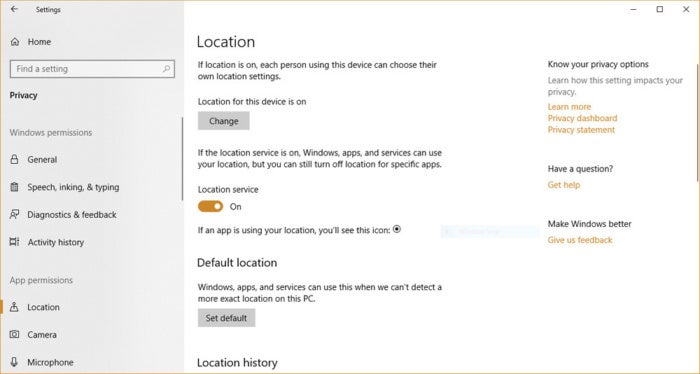
But it also allows some websites to store our location which can be used for collecting our personal information. We can turn off location by Privacy->Location . Click on change. And move the slider to Off from On.
2. Turn off web cam:
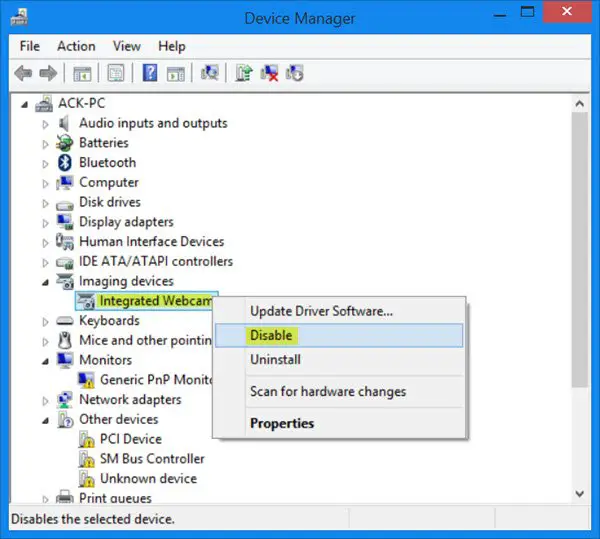
Web cam is useful feature for making calls with our friends and family members. But some websites access our webcam without any needs. They spy us and store our information in their database. Turning off webcam can protect our privacy.
Here are few methods which will help you to protect windows from unauthorized access.
1.Turn off location:
Windows is accessing our location through internet device. Its somehow a useful feature because through location, windows suggest us about our nearest location that is offering discounts on shopping, nearest hotels and weather updates.
But it also allows some websites to store our location which can be used for collecting our personal information. We can turn off location by Privacy->Location . Click on change. And move the slider to Off from On.
2. Turn off web cam:
Web cam is useful feature for making calls with our friends and family members. But some websites access our webcam without any needs. They spy us and store our information in their database. Turning off webcam can protect our privacy.


Comments
Post a Comment